

Would you like to understand how to choose the perfect COB LED display size for your needs? Would you like to understand how to troubleshoot issues with your LED COB display?
The size of a COB LED display directly impacts installation feasibility, viewing comfort, resolution quality, and overall cost efficiency. Whether you’re setting up a corporate boardroom, a control room, or a stage background, the right dimensions make all the difference.
In this comprehensive guide, I will walk you through everything you need to know about COB LED display sizes—from pixel pitch and physical dimensions to aspect ratios and installation considerations.
By the end, you will know to confidently select the ideal display size for your project, ensuring stunning visuals and long-term satisfaction.
Table of Contents
1: What is COB LED Screen Size?
COB LED screen size refers to the physical dimensions and pixel density of a display, which determine its resolution, viewing clarity, and optimal installation setup.
Unlike traditional LED screens, COB technology integrates LED chips directly onto the circuit board, allowing for tighter pixel pitches (smaller gaps between pixels) and more flexible sizing options.

The size of a COB LED display is defined by two key factors:
Physical Dimensions
Pixel Pitch
Pixel Pitch – The distance between pixels (measured in millimeters), which affects resolution and viewing distance
2: Why is the Size Important for an COB LED Screen?
The size of a COB LED screen plays a crucial role in determining its performance, visual quality, and suitability for different applications. Here’s why it matters:
-
Optimal Viewing Experience – The right screen size ensures clarity and comfort for viewers at various distances, preventing eye strain or visibility issues.
-
Resolution & Pixel Density – Smaller pixel pitches (tight spacing) in high-density COB screens deliver sharper images, ideal for close-range viewing.
-
Installation Flexibility – Proper sizing allows seamless integration into different environments, from compact indoor spaces to large outdoor venues.
-
Cost Efficiency – Larger screens with higher resolutions are more expensive, so choosing the right size balances budget and performance.
-
Content Compatibility – The display must match the intended content (e.g., detailed data vs. large-scale advertising) for maximum impact.
3: How to Calculate the COB LED Screen Size
Calculating the size of a COB LED screen is straightforward once you understand its core components—pixel pitch and resolution. Unlike traditional LED displays that rely on modules and cabinets, COB screens integrate LEDs directly onto the board, but the sizing principle remains similar.
A COB LED screen is made up of smaller COB LED modules that either fit into cabinets (which are then connected to form the full screen) or are connected directly without cabinets, especially in some custom or simpler installations. This modular approach allows you to flexibly calculate the screen’s size depending on what information you have available.
1. Calculating with Cabinets
If your screen uses cabinets, the screen size equals the number of cabinets (horizontally and vertically) multiplied by the size of each cabinet.
Formula:
Screen Width = Cabinet Width × Number of Cabinets (horizontal)
Screen Height = Cabinet Height × Number of Cabinets (vertical)
Example:
For 600 mm × 337.5 mm cabinets arranged as 2 cabinets wide × 2 cabinets high:
Screen Width = 960 × 2 = 1,920 mm
Screen Height = 337.5 × 2 = 675 mm
COB LED Screen size is 1,920 mm × 675 mm.
2. Calculating with Modules
Alternatively, if constructing the screen solely with modules, multiply the number of modules by their dimensions.
Formula:
Screen Width = Module Width × Number of Modules (horizontal)
Screen Height = Module Height × Number of Modules (vertical)
Example: With six 300 mm × 168.75 mm modules arranged horizontally and ten modules vertically, the screen size is:
Screen Width = 300 × 6 = 1,800 mm
Screen Height = 168.75 × 10 = 1687.5 mm
Screen size is 1,800 mm × 1687.5 mm.
3. If You Only Know Pixel Pitch and Resolution
When cabinet or module count is unknown, but you have pixel pitch and resolution (as in your example: P1.25, 1920×1080), here’s how to calculate:
- Screen Width = Horizontal Resolution × Pixel Pitch
- Screen Height = Vertical Resolution × Pixel Pitch
Both width and height calculations use the pixel pitch (in millimeters) as the length of one pixel.
Example Calculation:
Let’s take a P1.5625 COB screen (pixel pitch is 1.5625 mm), and the resolution is 1920 (horizontal) × 1080 (vertical):
- Screen Width = 1920 × 1.5625 mm = 3,000 mm (3 m)
- Screen Height = 1080 × 1.5625 mm = 1,687.5 mm (1.6875 m)
So, a COB LED wall with P1.5625 and 1920×1080 resolution would measure 3 m wide by 1.6875 m high.
4. Summary Table (using the formula):
| Parameter | Example Value | Calculation | Result |
| Pixel Pitch (P) | 1.25 mm | – | – |
| Resolution (H × V) | 1920 × 1080 | – | – |
| Screen Width (mm) | 1920 | 1920 × 1.25 | 2,400 mm |
| Screen Height (mm) | 1080 | 1080 × 1.25 | 1,350 mm |
| Screen Width (m) | – | 2,400 ÷ 1,000 | 2.4 m |
| Screen Height (m) | – | 1,350 ÷ 1,000 | 1.35 m |
4: Common COB LED Screen Sizes
The physical dimensions of a COB LED display are primarily determined by two key elements: individual LED module dimensions and cabinet assembly sizes, which combine to form the complete screen structure.
COB LED Module Sizes
The LED module is the fundamental component of the screen. While sizes vary among manufacturers, below are some common module dimensions (measured in millimeters):

| Size | Pixel Pitch |
| 300 mm x 168.75 mm | P1.85, P1.5625, P1.25, P0.9375, P0.78, P0.625 |
| 150 mm x 168.75 mm | P1.85, P1.5625, P1.25, P0.9375, P0.78, P0.625 |
COB LED Cabinet Sizes
Common cabinet for COB LED screen includes:

| Size | Pixel Pitch |
| 600 mm x 337.5 mm | P1.85, P1.5625, P1.25, P0.9375, P0.78, P0.625 |
| 500 mm x 500 mm | P1.85, P1.5625, P1.25 |
5 COB LED Screen Sizes: Measurements in Different Units
While COB LED display dimensions are primarily specified in millimeters (mm) as the industry standard, they can also be expressed in various other units depending on regional preferences or project requirements.
Common alternative measurement units include centimeters (cm), meters (m), feet (ft), and inches (in).
COB LED Screen Sizes in Centimeters (cm)
To convert standard COB LED screen dimensions from millimeters to centimeters (where 1cm = 10mm), the resulting measurements for module-based displays would appear as follows:
| Size | Pixel Pitch |
| 30 cm x 16.875 cm | P1.85, P1.5625, P1.25, P0.9375, P0.78, P0.625 |
| 15 cm x 16.875 cm | P1.85, P1.5625, P1.25, P0.9375, P0.78, P0.625 |
In addition, the standard COB LED display sizes using cabinets will be like this:
| Size | Pixel Pitch |
| 60 cm x 33.75 cm | P1.85, P1.5625, P1.25, P0.9375, P0.78, P0.625 |
| 50 cm x 50 cm | P1.85, P1.5625, P1.25 |
COB LED Screen Sizes in Meters (m)
Additionally, COB LED screen dimensions are often represented in meters, especially for large-scale installations. Using meters makes it easier to visualize and plan for sizeable displays. To convert millimeters to meters, simply divide the value by 1,000.
Below are typical sizes when constructing screens using common COB LED modules.
| Size | Pixel Pitch |
| 0.3 m x 0.16875 m | P1.85, P1.5625, P1.25, P0.9375, P0.78, P0.625 |
| 0.15 m x 0.16875 m | P1.85, P1.5625, P1.25, P0.9375, P0.78, P0.625 |
When it comes to the cabinet, the COB LED screen size will be shown as follows:
| Size | Pixel Pitch |
| 0.6 m x 0.3375 cm | P1.85, P1.5625, P1.25, P0.9375, P0.78, P0.625 |
| 0.5 cm x 0.5 cm | P1.85, P1.5625, P1.25 |
COB LED Screen Sizes in Feet (ft)
To convert millimeters to feet, divide by 304.8.
Here is the COB screen size measured in feet if we use modules.
| Size | Pixel Pitch |
| 0.984 ft x 0.554 ft | P1.85, P1.5625, P1.25, P0.9375, P0.78, P0.625 |
| 0.492 ft x 0.554 ft | P1.85, P1.5625, P1.25, P0.9375, P0.78, P0.625 |
Here is the COB screen size measured in feet if we use cabinets.
| Size | Pixel Pitch |
| 1.97 ft x 1.11 ft | P1.85, P1.5625, P1.25, P0.9375, P0.78, P0.625 |
| 1.64 cm x 1.64 cm | P1.85, P1.5625, P1.25 |
COB LED Screen Sizes in Inch
Similarly, Here is the COB screen size measured in Inches if we use modules.
| Size | Pixel Pitch |
| 11.81 Inch x 6.64 Inch | P1.85, P1.5625, P1.25, P0.9375, P0.78, P0.625 |
| 5.91 Inch x 6.64 Inch | P1.85, P1.5625, P1.25, P0.9375, P0.78, P0.625 |
For the cabinet-based COB LED screen, the common size will be shown below:
| Size | Pixel Pitch |
| 23.62 Inch x 13.29 Inch | P1.85, P1.5625, P1.25, P0.9375, P0.78, P0.625 |
| 19.69 Inch x 19.69 Inch | P1.85, P1.5625, P1.25 |
COB LED Screen Sizes in Pixel Pitch
COB LED displays are measured not just by their physical size, but also by their pixel dimensions (often called resolution), indicated as width × height in pixels.
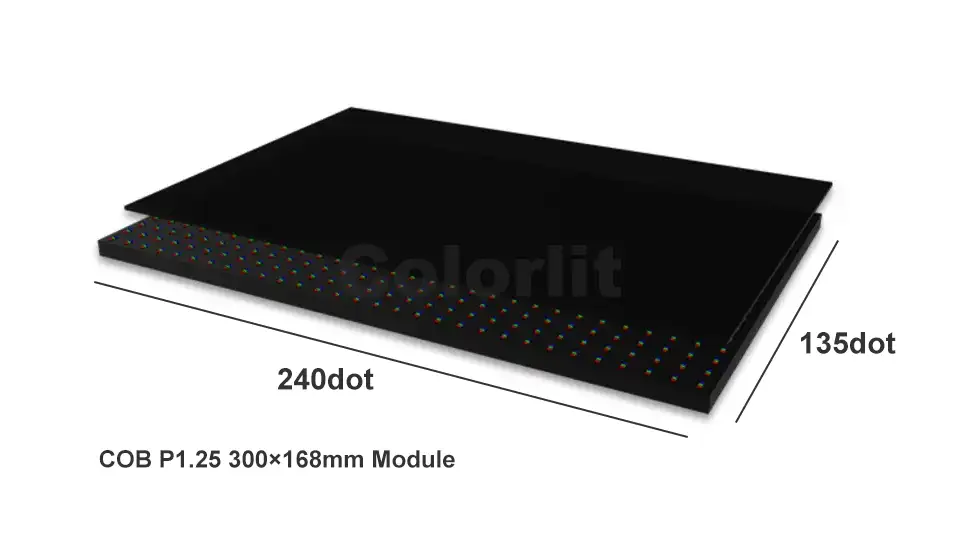
The pixel pitch—distance between the centers of two adjacent LEDs—together with the physical width and height, determines a display’s resolution. To find the pixel dimensions for any given COB LED display, you can use these straightforward formulas:
- Pixel Width = Screen Width ÷ Pixel Pitch
- Pixel Height = Screen Height ÷ Pixel Pitch
For example, let’s consider a P1.25 (pixel pitch: 1.25 mm) COB LED screen that measures 3000 mm (width) × 2025 mm (height):
- Pixel Width = 3000 ÷ 1.25 = 2400 pixels
- Pixel Height = 2025 ÷ 1.25 = 1620 pixels
So, a P1.25 LED screen of this size will have a resolution of 2400 × 1620 pixels.
This same calculation method applies to any pixel pitch and size combination, making it easy to determine the pixel resolution for any COB LED display. Common pixel resolutions for LED screens include standards like 720p (1280 × 720), 1080p (1920 × 1080, Full HD), 2K (2048 × 1080), 4K (3840 × 2160), and even 8K (7680 × 4320), depending on the overall display dimensions and the pixel pitch used.
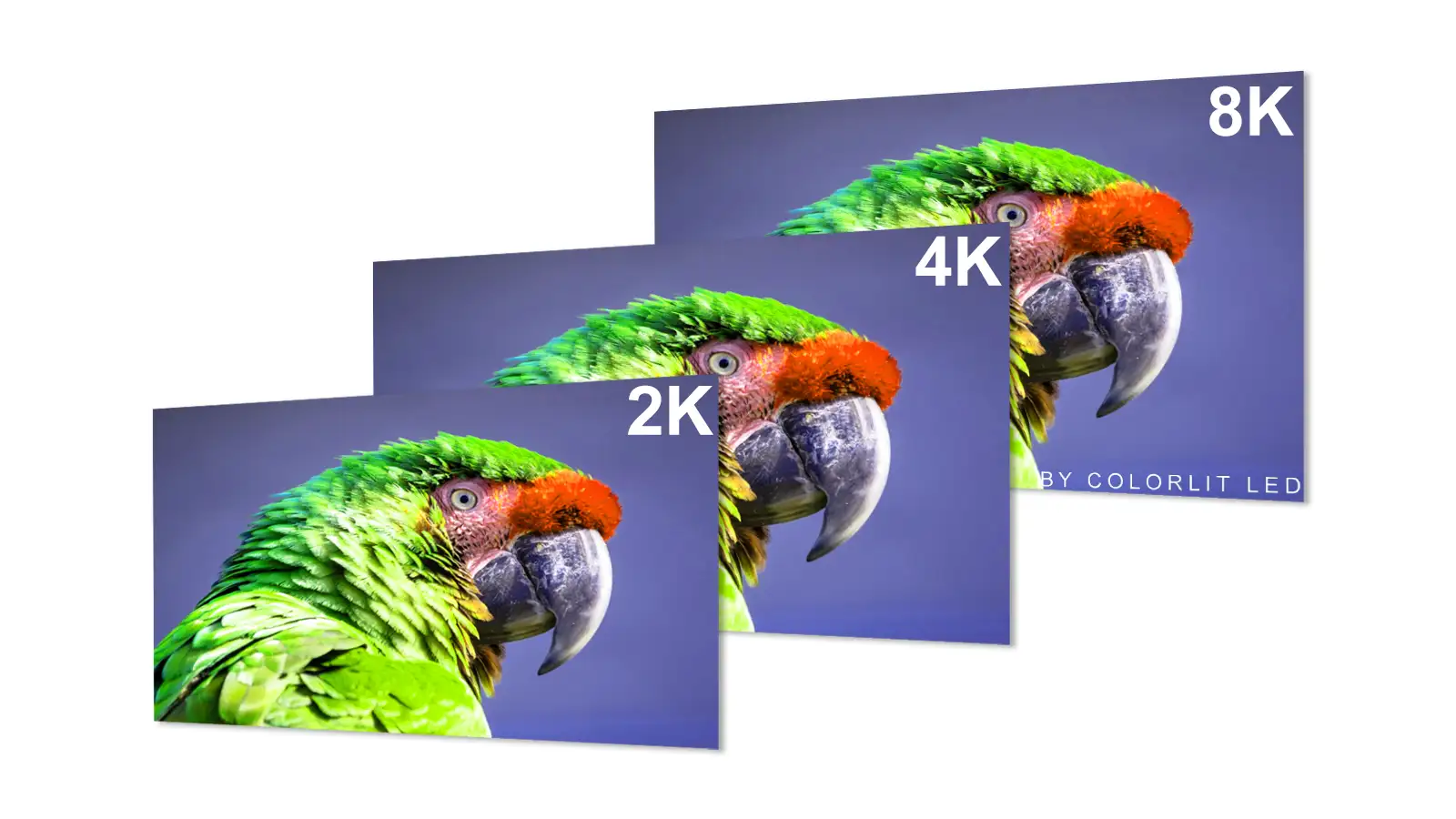
Here is a table for you reference:
| COB screen Size in Pixels (H x L) | COB Screen Resolution |
| 1280 x 720 pixels | 720P |
| 1920 x 1080 pixels | 1080P |
| 2560 x 1440 pixels | 2K |
| 4096 x 2160 pixels | 4K |
| 7680 x 4320 pixels | 8K |
6: Factors That Can Affect Your LED Screen Size Choice
Now you have learned the COB LED screen size and also its calculation methods. You might wonder: how to choose the COB LED screen size?
When selecting the appropriate size for a COB LED screen, several key factors must be considered to ensure you achieve the optimal display results for your application.
Pixel Pitch:
The pixel pitch (the distance between centers of adjacent LEDs) is one of the most important factors.

A smaller pixel pitch—such as P0.6 or P0.7—allows for higher resolution within a smaller display area, resulting in sharper images suitable for close-up viewing.
Larger pitches (P1.5 or P1.8) may be more cost-effective for large-sized applications where viewers are farther away, as these don’t require ultra-fine detail.
Viewing Distance:
Viewing distance is closely tied to pixel pitch. As we know, this distance is directly influenced by pixel pitch.
The general rule is: the closer your audience, the smaller the pitch you’ll need to avoid visible pixelation, and the larger the pitch you can tolerate as viewing distance increases.
As previously mentioned, the overall size of the LED screen also plays a role in determining the most suitable pixel pitch. This means that if your screen size changes and requires adjustment of the pixel pitch, the ideal viewing distance will shift as well.
For example, in a meeting room where viewers sit only 1–2 meters from the screen, P0.6–P1.2 is ideal for crisp, seamless visuals. In contrast, a screen with a P1.8 pitch might be perfectly suitable for a large lobby where people view the display from several meters away.

To clarify this relationship, here is a reference table outlining typical pixel pitches and their corresponding optimal viewing distances.
| Pixel Pitch | Minimum Viewing Distance | Optimal Viewing Distance |
| COB P0.6 | 0.6 m | 0.6 to 6m |
| COB P0.7 | 0.7 m | 0.7 to 7m |
| COB P0.9 | 0.9 m | 0.9 to 9m |
| COB P1.2 | 1.2 m | 1.2 to 12m |
| COB P1.5 | 1.5 m | 1.5 to 15m |
| COB P1.8 | 1.8 m | 1.8 to 18m |
Budget:
Budget always plays a decisive role.
The overall investment required for a COB LED screen increases substantially with its size. Larger screens demand more LED chips, expansive wiring networks, and additional cabinets, all of which contribute to the escalating production costs. As screen dimensions grow, so too do the expenses associated with materials, engineering, and logistics.
Beyond the initial purchase, bigger COB LED displays typically incur greater ongoing maintenance expenses. More extensive setups often require more frequent servicing, a higher volume of replacement parts, and elevated labor fees—factors that can stretch your budget further over time.
For more information about the COB LED screen total price, check here.
12: Conclusion
In this post, we have covered all the essential aspects you need to know about COB LED display size—from understanding the basic structure and calculation methods to explaining pixel pitch, viewing distances, and budgeting.
We have also provided detailed formulas and practical examples, making it easier for you to select the right screen size for your unique application.
If you have any questions, need further advice, or would like a tailored recommendation for your project, please contact us. Our team is ready to assist you every step of the way—from initial planning to installation and beyond.


